Skip to content

Every business needs a brain.

A decision operations center.

Built for complex decisions.

Every system. All the data. One place.

One map of how the company decides.

Every business unit. One view.

What the company runs on.

What each leader cares about.

What's changing, inside and out.

From signal to decision. Faster than anyone.

  • Revenue Acceleration
  • Margin Expansion
  • Competitive Advantage
  • Risk Reduction
  • Strategic Adaptation
  1. CEO: We have too many systems that don't talk.
  2. CEO: The competition is changing around us, fast.
  3. CEO: I need to keep up, but our data is chaos.
  4. CEO: These systems aren't helping us make decisions.
  5. Snowfire: You're not short on data.
  6. Snowfire: You're short on one picture of the company.
  7. CEO: What's the fix, and how fast?
  8. Snowfire: An AI brain for the business.
  9. Snowfire: We correlate your systems into one operating system. First look at your data in about 24 hours.
  10. CEO: What about security?
  11. Snowfire: Isolated infrastructure.
  12. Snowfire: Model agnostic.
  13. Snowfire: Your data stays in your control.
  14. CEO: Why does this make sense for us?
  15. Snowfire: Your critical data becomes one knowledge graph.
  16. Snowfire: You and your leadership team get decision intelligence.
  17. Snowfire: Your teams get signals.
  18. Snowfire: That is how you grow revenue, hold margin, and pull ahead.
  19. CEO: First look at your data in about 24 hours?
  20. Snowfire: Yes.
  21. Snowfire: Snowfire is the brain and operating system of the company.
  22. Snowfire: Smarter decisions. First look at your data in about 24 hours.

Command the chaos. Make smarter decisions

We build the world's best enterprise brain graph.

One decision layer for the C-suite and every business unit.

What Snowfire does

Snowfire is one product. Its four parts share the same connected data and the same metric definitions, so a Signal, an answer and a scheduled update all agree on the number.

Connectors

750+ connectors to the systems you run.

Metrics

Connected data becomes Metrics, each with one definition, so every team starts from the same figure.

Signals

Signals watch those metrics, plus competitors, news and regulation, and rank what changed by impact.

Chat

Interrogate any number in Chat. It answers from the same metrics and shows where each figure came from.

Chat with your entire business data estate

Snowfire speaks first.

Chat tools wait for a question. Dashboards show what someone decided to build. Snowfire runs Signals across your connected systems and the market, so the change finds you. When you do have a question, Chat answers from the same governed metrics, so the answer and the Signal agree.
Product video: Signals

Snowfire works alongside the tools your team already uses. Most teams keep them and add Snowfire for the executive view. How the platform works

“Isn’t that what Claude does?” A general assistant answers what you put in front of it. Chat works on your connected systems and metric definitions, and Signals raise changes before anyone asks.

Examples

  • Example · Forecast week

    Monday morning, a Signal lands: three late-stage deals in one region went quiet the same week a competitor cut prices there. The Signal links the news story and lists the deals and their owners. Before the forecast call, the CRO asks Chat which reps own those deals and when each one last met the buyer. Finance checks the same deals against plan using one definition of bookings. The call starts from what moved instead of from the roll-up.

  • Example · The close

    Freight cost per order in one business line has climbed for six weeks while price held flat. A Signal flags the margin drift weeks before close, with the metric’s formula and the source systems behind it. The CFO raises it in the next business review instead of explaining it after the quarter.

See your data unified.

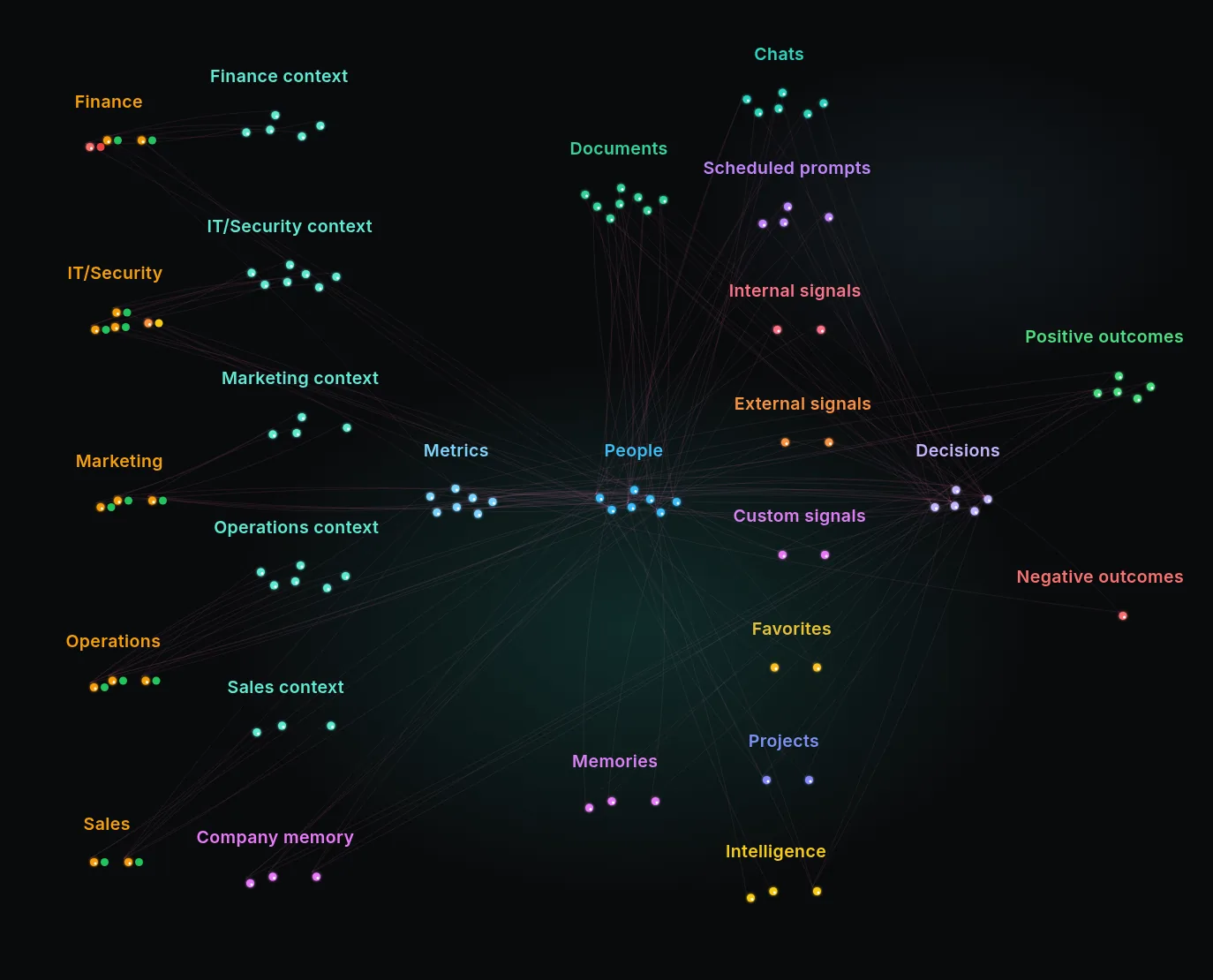
This is the Knowledge Constellation. Hover, tap, or tab to any node to trace how your connectors, context, and people flow into decisions and outcomes.

Hover any node to trace it from connector to outcome.

Swipe sideways to see the full map.

The Snowfire Knowledge Constellation. Connectors are grouped by business unit (Finance, IT/Security, Marketing, Operations, Sales), each with its own table context. Context flows through Metrics and People into Chats, Scheduled prompts, signals, Favorites, Projects, and Intelligence, then into Decisions and their positive and negative outcomes.

What each executive sees

CEO

The few changes across revenue, margin, operations and the market that should alter the plan this week, ranked by impact.

Example · CEO at Halvard, sample data
  1. Connect

    • Salesforce
    • NetSuite
    • ADP Workforce Now
    • Snowflake
  2. Metrics

    • Bookings vs plan
    • Gross margin
    • Headcount vs plan
  3. Signal

    SignalThree board metrics moved since the last meeting. Bookings are 6% under plan, gross margin is down 2 points, and hiring is behind plan.

  4. Ask

    • What will the board ask, and what’s our answer?
  5. Project

    ProjectBoard meeting prep

    • Explain the bookings gap
    • Update the board deck

CRO

Deals and accounts that moved since the last forecast call, the segments off pace, and the competitor moves tied to them.

Example · CRO at Halvard, sample data
  1. Connect

    • Salesforce
    • HubSpot
    • Gong
    • Marketo
  2. Metrics

    • Pipeline coverage
    • Win rate
    • Commit
  3. Signal

    SignalThree late-stage deals in one region went quiet the same week a competitor cut prices there.

  4. Ask

    • Which deals over our threshold moved backward since Friday, and why?
  5. Project

    ProjectRegional deal recovery

    • Call plan for the three deals
    • Pricing answer for the region

CFO

Margin, spend and forecast drift by business line, flagged before close, with the metric definition and sources attached.

Example · CFO at Halvard, sample data
  1. Connect

    • NetSuite
    • Stripe
    • Zuora
    • Snowflake
  2. Metrics

    • Gross margin
    • Freight cost per order
    • Spend vs budget
  3. Signal

    SignalFreight cost per order up 14% over six weeks in one business line, while price held flat.

  4. Ask

    • Where is margin slipping by business line this month, and why?
  5. Project

    ProjectPricing review before close

    • Check the vendor invoices
    • Model the price change

COO

Sites and teams behind target, the trend behind each slip, and the outside events that touch operations.

Example · COO at Halvard, sample data
  1. Connect

    • Oracle
    • ADP Workforce Now
    • Freshdesk
    • Asana
  2. Metrics

    • Throughput vs target
    • Overtime hours
    • On-time delivery
  3. Signal

    SignalSite 4 throughput is 9% under target for 3 weeks, and overtime is up 22%.

  4. Ask

    • Which shifts account for most of the overtime this month?
  5. Project

    ProjectSite 4 shift staffing

    • Rebalance the two shifts
    • Report back at the Monday review

CIO

Which connectors are healthy, which need attention and why, and who can reach which data.

Example · CIO at Halvard, sample data
  1. Connect

    • Okta
    • Snowflake
    • Databricks
    • ServiceNow
  2. Metrics

    • Connector health
    • Data freshness
    • Access by role
  3. Signal

    SignalA connector stopped syncing. Data Management flags it with a plain-language reason.

  4. Ask

    • Which connectors need attention, and why?
  5. Project

    ProjectFix the sync before Monday

    • Fix the cause
    • Confirm the data is current

The cost of finding out late

Every leadership team knows this week. The forecast call starts and someone asks why commit dropped. Finance closes the month and a margin variance appears that nobody saw building.

See what Snowfire would raise for your business unit, on your systems.

What IT needs

Security and trust and Connectors are public, so IT can review Snowfire before the first call. Snowfire is SOC 2 Compliant, supports enterprise sign-in, and runs in our cloud, your private cloud (VPC) or on-prem. Setup starts with the systems behind one decision, not everything at once.

  • Salesforce
  • HubSpot
  • Microsoft Dynamics 365
  • NetSuite
  • QuickBooks
  • Xero
  • Sage Intacct
  • Workday Adaptive Planning
  • Oracle
  • Snowflake
  • Databricks
  • BigQuery
  • PostgreSQL
  • SQL Server
  • MySQL
  • Stripe
  • Zuora
  • Shopify
  • Gong
  • Outreach
  • Marketo
  • Google Analytics 4
  • Google Ads
  • Facebook Ads
  • Intercom
  • Zendesk Chat
  • ServiceNow
  • Jira
  • Asana
  • monday.com
  • GitHub
  • Slack
  • ADP Workforce Now
  • Greenhouse
  • Okta
  • Tableau
  • Looker
  • Azure Blob Storage
  • SAP Concur
  • Pipedrive
  • Zoho CRM
  • Freshdesk
A sample of the 750+ connectors. Find your systems

Questions

  • Do we need a clean data warehouse first?

    No. Start with the systems behind one decision. Snowfire connects to them directly, and you add more as teams adopt.

  • Do we have to replace Claude or our BI tool?

    No. Snowfire works alongside them. They answer the questions people ask. Snowfire raises the changes nobody has asked about yet.

  • How do Signals reach me?

    In the app, and in Slack, Teams or email. Each Signal links back to its source.

  • How do we know an answer is right?

    Each metric has one definition with its formula and sources. In Chat, figures are checked against the data the assistant was shown, and when no lookup ran, the answer says its figures were not checked.

  • Is it secure?

    Snowfire is SOC 2 Compliant, supports enterprise sign-in with multi-factor authentication, and runs in our cloud, your private cloud (VPC) or on-prem.

  • What does it cost?

    Pricing is Enterprise.

Find out what Snowfire would raise for your business unit.

Bring one decision you make every week, and the systems behind it.

750+ connectorsAbout 24 hours to first lookSOC 2 Compliant

What happens in the demo

  1. Tell us your business unit and the decision you make every week.
  2. See the Signals Snowfire would raise for that unit.
  3. Ask your weekly questions and see the source behind each answer.
  4. Hear what setup involves and how security works. First look at your data in about 24 hours.